
Storing Your Data

The storage process begins by saving the generated files to a personal computer or server, so that they are accessible to other team members. It is strongly recommended to use reliable storage media (avoiding, for example, storage on USB drives, except on a very
temporary).Platforms such as Google Drive or Dropbox, whose servers are located outside the European Union, should also be avoided in favor of institutional solutions.If the data contains personal or sensitive information, data security procedures (such as encryption and others related to access rights) must also be planned in advance to avoid any risks to the data produced.
It is essential to perform regular backups, combined with automatic data recovery procedures in the event of an incident. Backups should be performed automatically whenever possible using specialized software that allows you to define what is saved and how often. This software also helps restore data from a specific backup.
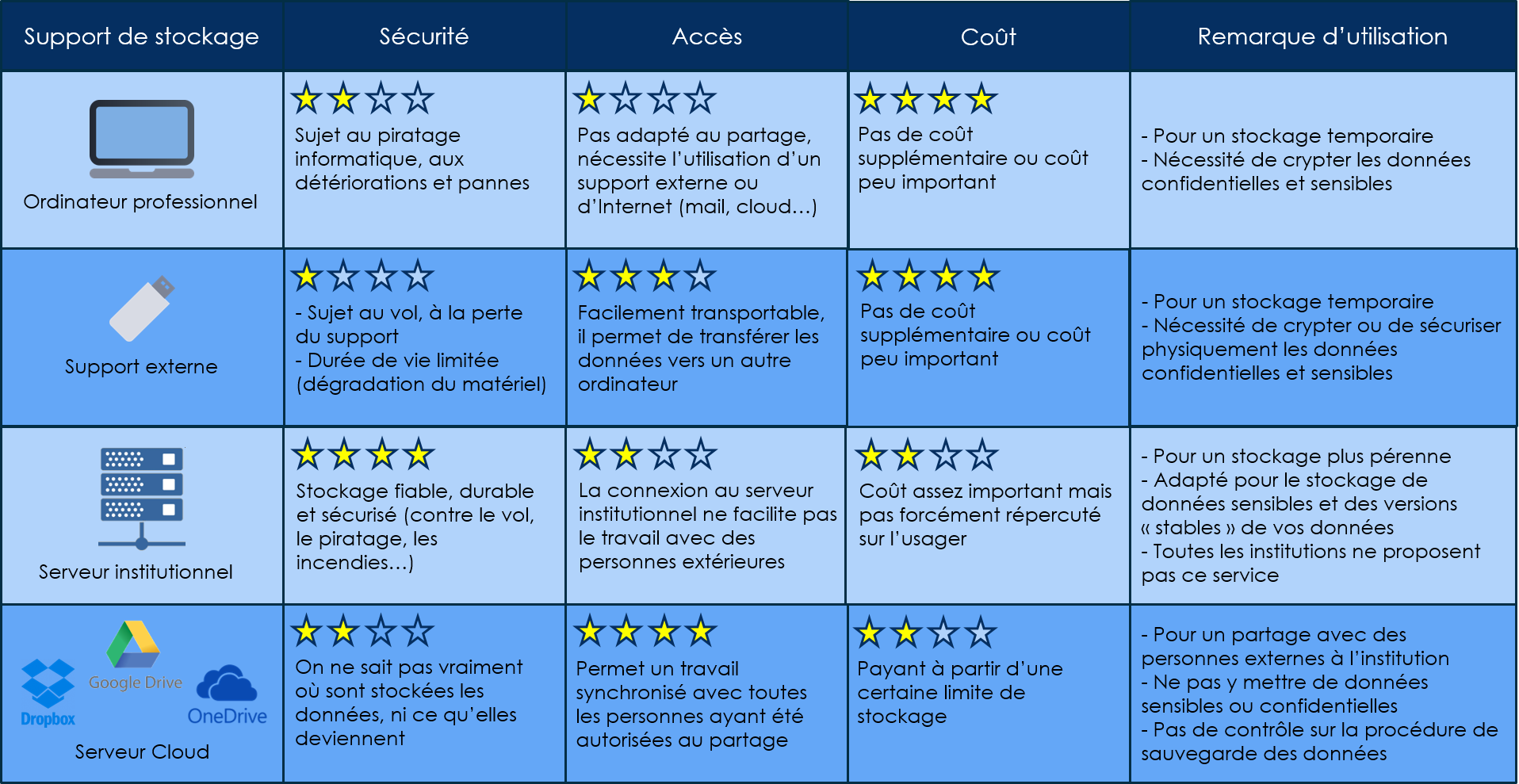
Source : https://doranum.fr/stockage-archivage/stockage-donnees_10_13143_z0ge-nc29/
Some good practices
- Keep multiple copies of your data in different storage storage.
- Backup Rule 3-2-1 : 3 copies on 2 media, with at least 1 remote copy
- Manage data to data: secure access for partners, verification of access at the end of project
- Encrypt the data if it present a senstivie information
- Use a remote acccess (DropSU, ODS MyCore at the CNRS ot at INSERM)
Storage Services Offered by Sorbonne University
Large Volumes of Data
The SACADO unit can be contacted to request storage space. Here are a few examples of the services offered:
- Access to a supercomputer
- Hosting of a scientific application or web portal
- Data storage
DropSU
Sorbonne University offers each member of its community 100 GB of storage space,DropSU. You can share uploaded documents and collaborate on them.
You can request data hosting through the Sorbonne University hotline. See the “Infrastructure: VMs, Servers, Storage” category.