
Organizing and Describing Your Data
Whether for the purpose of sharing or preservation, it is essential to properly describe and organize your data. Your dataset must be understandable to someone who did not participate in the project: they must be able to navigate the directory structure, know the contents of a file without having to open it, and quickly understand its contents.
In most disciplines, standards have been developed to normalise practices for organizing a dataset, describing it (using metadata), and structuring files. It is recommended that you use these standards. If you do not use them, it is recommended that you document your practices in detail. Remember that you will be the first to reuse your data: this work of structuring and describing it will also benefit you.
Use open, structured, and well-documented file formats
Prioritize open formats
Here are the main characteristics of open formats:
- They are transparently encoded files.
- Their specifications are in the public domain.
- They are interoperable: they can be created, read, and modified by any software designed to handle this type of file.
It is strongly recommended that you prioritize these formats, as they facilitate the reuse of your data as well as its long-term preservation.
If you use a proprietary format, whether because it is the standard in your field or because you are dependent on a specific software program, it is important to specify, in the ReadMe file and in the metadata, the software or instruments used. Be sure to include the exact name, publisher, or manufacturer, as well as the version.
Finally, note that simply choosing an open format is not enough to guarantee the reuse of your data: it is also essential to prioritize structured formats and, when relevant, editable ones.
Some Resources:
- DORANum, Open or Closed Format? https://doi.org/10.13143/MCWQ-QS64
- FACILE, format validation service https://facile.cines.fr/
- JHOVE Open-source file format identification, validation, and characterization https://jhove.openpreservation.org/
Comply with disciplinary standards
Standards (sometimes also referred to as formats) define how your data is structured within a file (for example: variable names, rules for using variables (mandatory or optional, unique or repeatable, closed value lists, etc.).
Some standards also include information about the file itself, the context in which it was created, or the context in which the data was acquired. This information, often generated automatically by the data acquisition software, promotes traceability and reproducibility. It is therefore preferable to use formats that offer rich metadata (for more details, see the Metadata section).
Examples:
- TEI: Based on the XML format, it allows text documents to be structured using tags.
- OME-TIFF: Used in microscopy, this container combines image files in TIFF format with metadata files in XML format.
- The Minimum Information Standards (MIxE): These comprise a set of standards related to omics experiments (MIAME, MINSEQE, MIAPE, MIFlowCyt, etc.)
Don’t use a standard? Document the structure of your files!
There are situations where you cannot use discipline-specific standards, either because they are not suitable or because you lack the tools to do so. In this case, it is essential to document the structure of your files to make them understandable and reusable.
Specify the names of your variables, their types (string, number, boolean, date, etc.), and the rules for filling them in (required/optional, unique/repeated, controlled value list, standards, units).
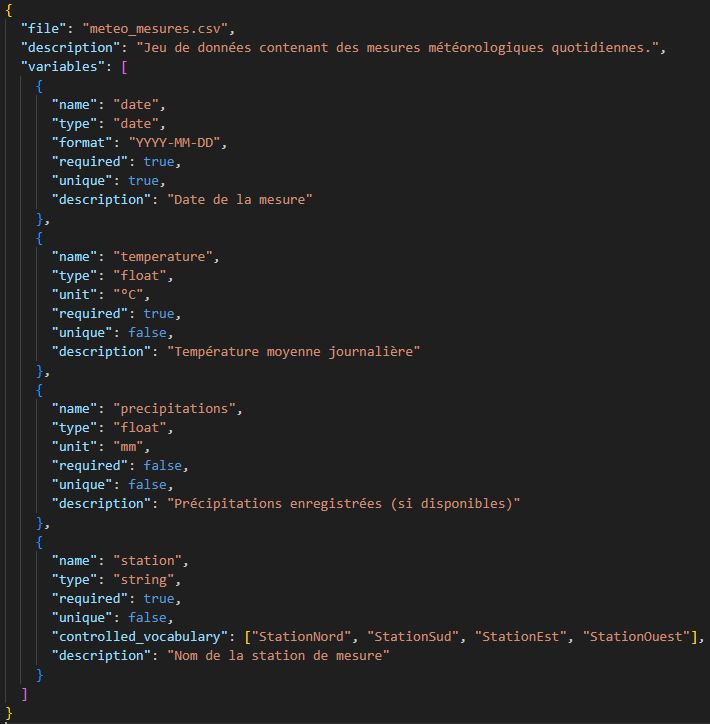
To do this, you can:
- Use “sidecar” files: Create a file in an open, structured format (XML, JSON, CSV) that documents the structure of a file or file type contained in your dataset. It must be easily identifiable and associated with the file it describes; to ensure this, use a clear naming convention.
- Specify this information in a ReadMe file.
Organize and describe your dataset
Organize and name your files correctly
A dataset consists of a set of files. When it is complex, it must be structured into a folder hierarchy. At the root of your dataset, you’ll typically find files that are common to the entire dataset (a metadata file, a reuse license, a README file, etc.).

To make your data easier to understand and reuse, your organization must follow certain rules:
- Organize and name your files in a way that is logical, consistent, and understandable to others.
- Avoid overly deep directory structures (too many nested folders).
- Limit redundant information at different levels of the directory structure.
- Delete duplicate files.
- Do not use file names that are too long.
- Avoid spaces (use hyphens or underscores instead) and accented characters.
- Use an unambiguous date format, such as YYYYMMDD or YYYY-MM-DD.
It is important to think about how to name and organize your files before the project begins. Then document your organizational choices and naming conventions in the ReadMe file, located at the root of your dataset.
Some Resources:
Thorsten Arendt, Mittal, D., Sehara, K., Cook, T., & Julien Colomb. (2023). Folder structure template for research repositories (v2.4). Zenodo. https://doi.org/10.5281/zenodo.7763694
Urfist Méditerranée, & Institut de l’Information Scientifique et Technique. (2023). DoRANum—Storage and Archiving: How to Name Your Files Properly? DoRANum. https://doi.org/10.13143/WGQW-AA59
You can also rely on international or discipline-specific standards that prescribe rules for organization and naming. This way, anyone or any software familiar with this standard will be able to easily navigate your dataset. Examples:
- In medical imaging, the BIDS (Brain Imaging Data Structure) standard proposes a directory-based structure (one folder per study subject, which can be further divided into subdirectories by data type or acquisition phase). It also defines a naming convention based on a closed list of
- The HDF5 (Hierarchical Data Format) format complements the tree-based approach with an internal organization into “groups” for classifying files.
In most cases, the use of standards is transparent, as it is directly supported by the software or scripts used.
Describe your dataset with metadata
Beyond the file descriptions (mentioned earlier), it is essential to document your dataset as a whole. This approach offers several advantages:
- Documenting the content: It allows potential reusers to get a clear idea of the dataset’s content without having to download or open the files that make it up.
- Improving discoverability: It facilitates the indexing of your dataset in catalogs or search engines, thereby increasing its visibility.
- Enabling citation: Your dataset can be cited correctly (authors, title, date, identifier, etc.).
There are various metadata standards for describing a dataset. The most widely used general-purpose standard is DataCite. It allows you to associate a wide range of information with a dataset, such as: authors, a title, keywords, a description, funding sources, as well as relationships with other research outputs, etc.
When you share your dataset on a data repository, choosing the standard and adding metadata is relatively straightforward. You choose a repository (sometimes discipline-specific) that requires you to use a metadata standard. Metadata is most often added via an input form.
Write a ReadMe file
Metadata is a structured way to provide information about your dataset. It is most often designed to be interpreted and used by software (search engines, catalogs, data repositories, etc.).
The ReadMe file, on the other hand, provides a more detailed, narrative, and less rigid description intended for humans. In this file, you should, in particular:
- Describe the content of your dataset.
- Specify the software, methods, and equipment used to collect and/or analyze the data, as well as the software required to read it.
- Outline the naming and organizational conventions for the dataset.
- Describe the metadata or variables when they do not conform to any standard and are not specified in any accompanying files (e.g., variable description, type, units, allowed values, etc.).
This file is typically written in plain text format (.txt); however, you may use Markdown (.md) if you prefer a clearer structure. It is usually placed in the root directory of your dataset. Note that you may create multiple ReadMe files to document different types of data within your dataset.
Focus on Metadata
Metadata is data used to precisely describe an object. It is essential not only for organizing your data effectively but also for analyzing it. There are generally two types of metadata:
- Embedded metadata: technical information generated automatically, such as a photo’s creation date, a file’s size, or its name.
- Enriched metadata: information added by the researcher during the analysis phase, or to document a file or dataset.
Standards
A metadata standard is a set of rules governing the structuring and use of metadata. Recognized, standardized, and widely used, it can define:
- The variables used to describe data,
- Required or optional variables,
- Unique or repeatable variables,
- Rules for populating fields (date formats, controlled vocabularies, etc.).
There are many standards. The choice should be based on the type of data being processed and the scientific field. Examples:
- Generic standards: Dublin Core (widely used to describe web resources), DataCite (used to describe research outputs, including datasets and software).
- Disciplinary standards: MIDAS-Heritage (architecture), EML (ecology), DDI (surveys)
To identify a standard suited to your data and your discipline, there are several options:
- Consult the standards used by data repositories in your discipline (see Sharing Your Data).
- Explore catalogs dedicated to standards and metadata: Digital Curation Centre, Metadata Standards Catalog ...
- Seek advice from subject-matter experts at your institution: research platforms often serve as points of contact, and the engineers working there frequently have expertise in file, data, and metadata standards (see Collecting Data).
- Contact Us: we can assist you in identifying the standard best suited to your needs.
Controlled Vocabularies and Standards
Even if the standard you’re using doesn’t specify particular vocabularies or standards for populating your fields, it’s strongly recommended that you use them. Using controlled vocabularies or standards allows you to:
- standardize values within your dataset,
- facilitate interoperability with other datasets,
- improve the understanding and reuse of your data.
Examples of standards:
- ISO 8601 for dates (format: YYYY-MM-DD).
- ISO 639 for languages (2- or 3-letter codes, e.g., fr, fre, fra).
Examples of controlled vocabularies:
- Strunz Classification for minerals.
- IUPAC Nomenclature for chemical compounds.
- Pactols Thesaurus, dedicated to the indexing of subjects and places in archaeology.
- MESH Thesaurus for the biomedical sciences
Resources for finding disciplinary vocabularies: